
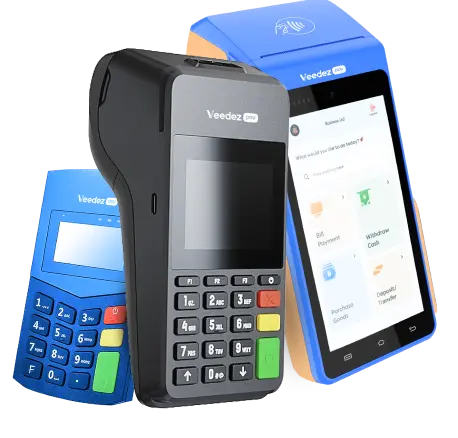
POS Machine – A Complete Guide for Modern Businesses
POS Machine – Everything You Need to Know
Running a business today means handling fast payments, managing customers, and keeping correct records. This is why more companies are choosing a POS machine. It helps stores, restaurants, pharmacies, bakeries, and service providers work better and grow faster. In this detailed guide, you will learn how POS machines work, their types, benefits, pricing, and how to choose the right one for your business.
What Is a POS Machine?
A POS machine is a device used to accept payments from customers. It reads cards, scans QR codes, prints receipts, and records every sale. Many machines also support digital wallets and contactless payments. They help businesses work smoothly by connecting sales, inventory, and reporting in one system.
POS machines are used everywhere now because customers want quick and secure payments. Whether you have a small shop or a large retail chain, a POS machine improves workflow and customer experience.
Types of POS Machines
1. Traditional Card-Swipe POS
These machines allow customers to pay using debit and credit cards. They read magnetic cards and print receipts. Many small shops prefer them because they are simple and affordable.
2. Smart Android POS Machines
These modern devices run on Android and include a touch screen, a receipt printer, a camera for QR scanning, SIM/4G support, and mobile apps. They handle sales, inventory, and billing all in one.
3. Wireless Handheld POS
These portable machines are used in restaurants, food courts, parking areas, and delivery services. They are small, fast, and easy to carry.
4. QR and NFC Payment POS
These machines support contactless payments, which are becoming popular worldwide. Customers can pay by tapping their cards or scanning a QR code.
5. POS with Billing Software
These systems work like a mini-computer. They handle stock, sales, customer data, reports, and accounts. They are best for supermarkets, pharmacies, and retail chains.
How a POS Machine Works
A POS machine works in a simple step-by-step process:
- The customer gives the card or scans it through NFC.
- The POS machine sends the transaction request to the bank.
- The bank checks the balance and approves the payment.
- The POS prints a receipt or shows a digital confirmation.
- The business gets the payment in its account.
This entire process takes only a few seconds, making payments fast and secure.
Why Businesses Need a POS Machine
1. Fast and Easy Payments
A POS machine reduces waiting time. Customers can pay in seconds, which improves satisfaction and keeps the queue moving.
2. Accurate Sales Tracking
Every sale is recorded. You don’t need to write anything by hand. This prevents errors and saves time.
3. More Payment Options
Customers can pay through:
- Debit cards
- Credit cards
- Mobile wallets
- QR scanning
- Contactless NFC
- More options mean more sales.
4. Professional Business Image
A business that accepts digital payments looks modern and trustworthy. Customers feel safe when using their cards.
5. Better Inventory Control
Smart POS machines track stock levels. When items are low, the system reminds you. This helps avoid shortages.
6. Detailed Reports
You get daily, weekly, and monthly sales reports. These reports help you understand which products sell the most and what needs improvement.
POS Machine Price and What Affects It
The price of a POS machine depends on its type and features. The main factors include:
- Touch screen size
- Receipt printer quality
- Battery backup
- 4G or Wi-Fi support
- Inventory and billing software
- Build quality
- Brand reputation
Basic POS machines are cheaper, while advanced POS billing machines cost more but offer full business solutions.
Related more articles, pos software pakistan
Where POS Machines Are Used
Retail Stores
For quick billing, barcode scanning, and stock management.
Restaurants and Cafes
Used for table orders, kitchen printing, and bill settlement.
Pharmacies
Helps manage stock, expiry alerts, and fast counter billing.
Supermarkets
Supports barcode scanning, bulk items, customer loyalty, and smart checkout.
Bakeries and Sweet Shops
Offers fast sale options and customized item lists.
Mobile Businesses
Delivery services, pop-up stalls, and events use wireless POS machines.
How to Choose the Right POS Machine
1. Decide Your Business Need
A small shop may only need a card-swipe machine. A grocery store needs a full POS with billing and stock control.
2. Check Payment Support
Choose a machine that supports chip, swipe, QR, and NFC.
3. Look for Software Features
Good POS software should include:
- Sales reports
- Inventory alerts
- Customer history
- Employee login
- Discounts and offers
4. Verify Battery and Connectivity
For mobile businesses, long battery life and 4G/5G support are important.
5. Check Warranty and Support
Pick a brand that offers quick technical help and spare parts.
Benefits of Switching to a POS Machine
- Faster checkout
- Reduced errors
- Better cash flow
- Digital record keeping
- Higher customer trust
- Increased business efficiency
- Better decision-making with reports
- Secure payment process
A POS machine is not just a payment device. It is a complete business tool.
Future of POS Machines
With online payments growing, POS machines will become even smarter. Future models will include:
- AI data analysis
- Voice commands
- Biometric payment
- Advanced cloud billing
- Loyalty program automation
Businesses that adopt POS early will stay ahead of the competition.
Conclusion
A POS machine is essential for any modern business that wants smooth payments and professional operations. It helps you manage sales, build trust, and understand your business better. Whether you run a small store or a large retail chain, investing in a good POS machine is a smart decision for long-term growth. As payment trends change, POS machines will keep your business fast, secure, and ready for the future.
Related more articles, visit here